


Snes9x EX+
4.25.80K Reviews
App Specs
- Version
- 1.5.85
- Updated On
- License
- Free
- Downloads
- 10,000,000+
- Developer
- Robert Broglia
- Categories
- Arcade
- Platform
- Android
Screenshots
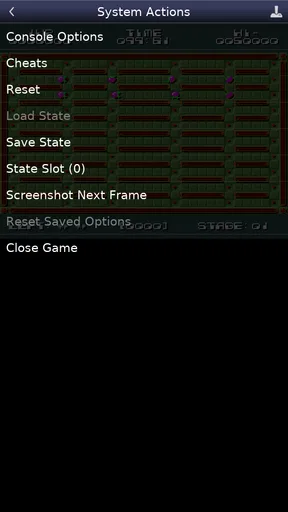
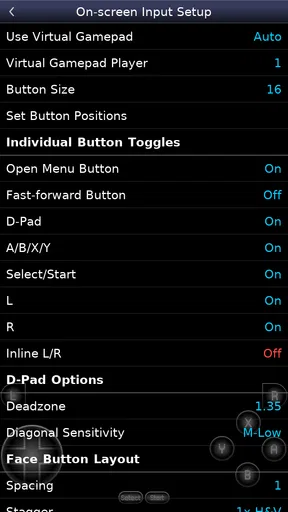
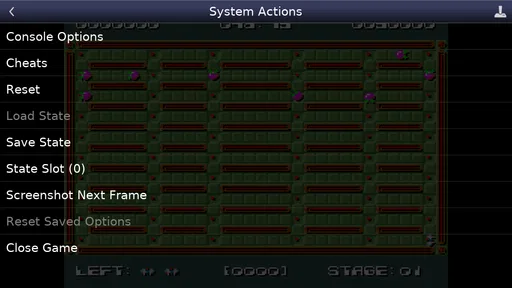
 Analysis by AppCompare
I approached Snes9x EX+ as a practical decision rather than simply another retro game download. It is a free arcade-category game from developer Robert Broglia, but its real purpose is different from a normal arcade release: it emulates the Super Nintendo Entertainment System. That distinction matters immediately. You are not downloading a single game with a fixed campaign; you are choosing a tool for playing compatible SNES software on a mobile device.
That makes the right question less about whether it has flashy graphics or a modern reward system and more about whether you want a straightforward way to revisit a particular console library. In my experience, this is where the app makes sense. It is focused, familiar once configured, and much less cluttered than many mobile alternatives. It is also more hands-on than a conventional game, so a little preparation is part of the experience.
What I considered before recommending it
My first decision criterion was ease of use. An emulator can be technically capable and still be frustrating if loading a game, arranging controls, or finding a save becomes confusing. Snes9x EX+ generally feels built for people who want to get to the game without passing through a long chain of menus. The interface is utilitarian rather than decorative, which I see as a strength when I am using a phone for a quick session.
The second criterion was the kind of player it serves. If you want an instant, self-contained arcade game, this is not the same proposition. You need compatible game files that you are entitled to use, and the app functions as the emulator rather than supplying a library of commercial games. That is an important practical boundary. Someone expecting to install it and immediately browse a catalogue may be disappointed, while someone who already has a legitimate personal collection will understand the workflow.
I also paid attention to controls. Touchscreen buttons can be perfectly usable for slower platformers, puzzle games, turn-based adventures, and menu-heavy role-playing games. They are less comfortable for fast action, precise diagonals, or games that ask for several buttons at once. A physical controller can change that experience considerably, but it also makes the setup less spontaneous. For me, the app is strongest when the phone is being used as a convenient portable screen rather than as a replacement for every kind of controller.
Finally, I considered longevity. The app has been available since January 11, 2013, and its current version is 1.5.85. It supports a very old Android baseline, beginning with Android 2.3, which helps explain why it can appeal to users with older hardware. I would not interpret that alone as a promise that every modern device or accessory behaves identically, but it does show that the project has a long mobile history rather than being a short-lived experiment.
The first setup is simple, but ownership still matters
The most important preparation is organizing your own game files before opening the emulator. I recommend keeping them in a clearly named folder and avoiding a scattered collection across downloads, messaging apps, and cloud storage. That small step saves time later, especially when you have several versions of the same title or want to move your collection to another device.
Worth Reading Before You Choose

EA SPORTS FC Mobile 26 Is a Bigger Football Game, but It Takes Time

Flipboard Shows What News Apps Must Do Beyond the Feed

Switching to Android Auto Means Rethinking Your Driving Routine

Google Calendar Makes a Crowded Week Easier to Manage

Ludo King Makes the Most of the Minutes Between Plans

Baby Panda World Brings Quick Play to Modern Phones, but Its Game Library Feels Busy
Snes9x EX+ does not remove the legal responsibility attached to those files. I would use it with games you have the right to use, such as personal backups where that is permitted in your location. This is not a criticism of the application; it is simply part of choosing an emulator instead of a conventional mobile game. The app gives you the player, while you remain responsible for the content you load.
One useful habit is to test a single game before importing everything. I open one title, check that the image fits comfortably, try the virtual buttons, and create a temporary save. This reveals whether the chosen control layout suits the game before I spend time arranging a larger library. It also gives me a quick way to distinguish an emulator setting issue from a problem with a particular file.
Why the focused design works so well
The biggest advantage is concentration. Snes9x EX+ is not trying to turn classic gaming into a social feed, a store, or a daily-challenge system. When I launch it, the purpose is clear: select compatible content, configure the way I want to play, and start. That makes it especially appealing for people who dislike mobile games filled with notifications, energy limits, subscriptions, or persistent progress systems.
Its free price strengthens that appeal. There is no purchase decision blocking the initial test, so I can see whether the controls and my device suit the experience before committing money to a dedicated handheld or another emulator. The app is also rated for Everyone, which reflects its general presentation, although the age suitability of the games a person loads can vary. Parents should judge the selected games as well as the emulator itself.
Another strength is flexibility in how I use it. A short session during a commute can work just as well as a longer evening session. I can choose a game that benefits from quick access, pause when necessary, and return later instead of treating the phone like a permanent console setup. That portability is the real reason I would recommend it over a more elaborate solution for many casual retro players.
The public response also suggests that it has reached a substantial audience: it has an average rating of 4.2 from around 115 thousand ratings, with roughly 5.8 thousand written reviews and over 10 million installs. I do not treat popularity as proof that every device will feel perfect, but it does make the app easier to consider as an established option rather than an obscure experiment.
Small workflow choices that improve everyday play
My first practical tip is to create separate folders for different types of games instead of placing every file in one long list. I might group platformers, role-playing games, and multiplayer-friendly titles separately. This is not a feature claim so much as a sensible way to reduce browsing friction inside any emulator library, and it becomes particularly helpful when the collection grows.
My second tip is to adjust the on-screen layout for the specific game rather than searching for one perfect arrangement. A platform game may benefit from larger directional controls, while a menu-driven adventure can tolerate smaller buttons and more screen space. I would also rotate the phone only when the change genuinely helps; constantly switching orientation can make a quick session feel less convenient than expected.
A third useful habit is to treat save states as a convenience, not as the only form of progress. I like them for pausing before a difficult section or preserving a short experiment, but I also keep using the game’s own save system when available. That gives me a more portable and natural progress path if I later change devices or decide to play through another setup.
For a realistic everyday scenario, imagine having twenty minutes after dinner and wanting to continue a classic adventure without unpacking an old console. I would open the emulator, select the organized file, use a familiar save point, and play with the phone resting on a stand. That is where it feels excellent: the session starts quickly, the hardware footprint is tiny, and I am not asked to manage a modern service around the game.
Where a different kind of emulator may fit better
The usual alternatives fall into several groups, and each group can be the better choice in a different situation. A multi-system emulator may be more convenient if your collection spans several consoles and you want one interface for everything. The trade-off is that broader support can bring more menus, more settings, and a less focused experience than this SNES-specific approach.
A dedicated handheld may suit you better if physical controls are central to your enjoyment. Buttons and a proper directional pad are usually more comfortable for long action sessions than a touchscreen. The cost is less immediate convenience: you need another device, another battery to charge, and another item to carry. Snes9x EX+ wins when the phone you already own is the priority.
There are also polished commercial retro collections and official re-releases. These can be preferable for people who want a curated catalogue, built-in presentation, and minimal file management. They may not offer the same freedom to use a personal collection, and they are a different purchasing model, but they remove much of the setup responsibility that comes with emulation.
Cloud-based or streaming approaches may appeal to users who want access across screens, yet they depend more heavily on network conditions and the service’s own availability. Snes9x EX+ is more attractive when I want local play and do not want a connection to be part of the basic session. On the other hand, if seamless synchronization between devices is your main concern, a different ecosystem may be less work.
I would also steer away from this app if you dislike configuring anything. Even a relatively approachable emulator asks you to understand files, controls, and saves. Someone who wants a game to behave like a modern one-tap download should choose a conventional mobile title or an official collection instead. The app is simple compared with many technical tools, but it is not entirely automatic.
The real cost of changing devices or platforms
Because the app is free, the financial barrier to trying it is low. The more meaningful cost is time. If you have already arranged a library, customized controls, and built a routine around the emulator, switching to another application means learning a new interface and checking how your saves and files transfer. That does not make switching difficult in every case, but it is worth considering before moving merely because another emulator looks more polished.
I recommend keeping your original game files and important saves in a separate, clearly backed-up location rather than treating the emulator installation as the only copy. This is good digital housekeeping and reduces dependence on any single app. It also makes comparing alternatives easier: you can test another option with the same legitimate content instead of rebuilding everything from scratch.
Switching may be worthwhile when your needs change. If you begin playing several different console generations, a broader emulator could reduce the number of apps you open. If you buy a dedicated controller and spend long hours playing, a setup designed around physical buttons may feel better. If you mostly play short sessions on an older Android phone, the light, focused nature of this app may remain the more sensible choice.
One question I would ask before changing is whether the problem is really the emulator. Sometimes the annoyance comes from a poor touchscreen layout, an untidy folder, or a game that is simply awkward with mobile controls. Testing one alternate layout and one different type of game can clarify the issue. If the experience improves, there may be no reason to abandon the app.
Who gets the most from Snes9x EX+
I recommend it most strongly to Android users who already know which SNES games they want to play and value direct access over decoration. It is a good match for retro enthusiasts, preservation-minded players using legitimate personal files, and casual users who want an inexpensive way to revisit a few favourites. It is also appealing to anyone who prefers local play without a modern account-driven game layer.
I am less enthusiastic about it for people who want a ready-made catalogue, competitive online features, or a premium console-like controller experience from the moment they install. It is not designed to replace every retro setup. The touchscreen can become the limiting factor, and the need to manage your own content may feel like unnecessary work if you simply want instant entertainment.
The Everyone rating and free availability make experimentation easy, but I would still explain the emulator concept to a less technical family member before recommending it. The essential distinction is simple: the app is the console environment, not a bundle of games. Once that is clear, the rest of the learning curve is manageable.
My recommendation after using it as a decision guide
Snes9x EX+ is a strong choice when your priority is focused, local SNES emulation on Android. I like that it avoids the distractions common in mobile gaming and lets the phone become a practical retro player. Its long availability, broad reach, free price, and low minimum Android requirement make it easy to try, while the current 1.5.85 release shows that it remains an active option for people who still want this kind of tool.
I would not choose it solely because it is popular or because it costs nothing. I would choose it because the workflow matches my needs: I have legitimate game files, I am comfortable adjusting controls, and I want to play in short or long local sessions without carrying a separate console. If those conditions describe you, this is the app I would suggest trying first.
If your priorities point elsewhere, another category may be better. Pick a dedicated handheld for physical controls, an official collection for curated convenience, or a multi-system emulator for a wider library. But for a reader asking me for a straightforward SNES-focused option on an Android phone, my answer is clear: install it, test one game, arrange the controls carefully, and judge it on the kind of play you actually do rather than on modern mobile-game expectations.
Pros
- Accurate SNES emulation with smooth performance on most devices.
- Supports save states for quick progress recovery.
- Customizable on-screen controls improve playability on touchscreens.
- Offers cheat support for users who enjoy modifying gameplay.
- Works with external controllers for a more authentic experience.
Cons
- Requires legally obtained ROM files; games are not included.
- Touch controls can feel cramped on smaller phone screens.
- Some advanced settings may confuse users new to emulation.
- Compatibility and performance can vary with demanding ROMs.
- The interface feels dated compared with newer emulator apps.
FAQs for Snes9x EX+
What is Snes9x EX+ and what devices does it support?
Snes9x EX+ is an emulator designed to run Super Nintendo Entertainment System games on mobile devices. It is available for Android and can work on many phones and tablets, including older hardware, provided the device meets the basic operating system requirements. Performance may vary depending on the processor, graphics hardware, and the complexity of the game being emulated.
Does Snes9x EX+ include Super Nintendo games?
No. Snes9x EX+ does not include commercial Super Nintendo games, and it is not a source for downloading ROMs. You must provide your own legally obtained game files and use them according to the copyright laws applicable in your country. The application is intended to provide the emulator itself, along with tools for loading and managing compatible game files.
How do I load games into Snes9x EX+?
After installing Snes9x EX+, you generally need to copy compatible ROM files to your device using a file manager, USB connection, or cloud storage. Open the emulator, browse to the folder containing your files, and select a game to start it. Supported formats can include commonly used compressed or uncompressed SNES ROM files, although compatibility may depend on the specific game and file version.
Does Snes9x EX+ support save states, controllers, and customization?
Yes. Snes9x EX+ offers useful features for mobile play, including normal in-game saving and quick save states that let you resume from a precise moment. It also supports customizable on-screen controls and, on compatible devices, external gamepads or keyboards. Display options, button layouts, audio settings, and performance-related controls can usually be adjusted to make games more comfortable to play.
Is Snes9x EX+ safe and easy to use for beginners?
Snes9x EX+ is generally straightforward once your legally owned ROM files are organized, and its simple interface makes basic emulation accessible to beginners. However, newcomers may need a little time to understand folders, save states, controller mapping, and emulator settings. Downloading the application from a trusted source is recommended, and users should avoid unofficial ROM websites or modified installer packages.


